Departments & the org chart
Once your people are in, structure matters. Departments and managers turn a flat list of names into an organisation chart — and, importantly, into a map of who is accountable for what.
Managing departments
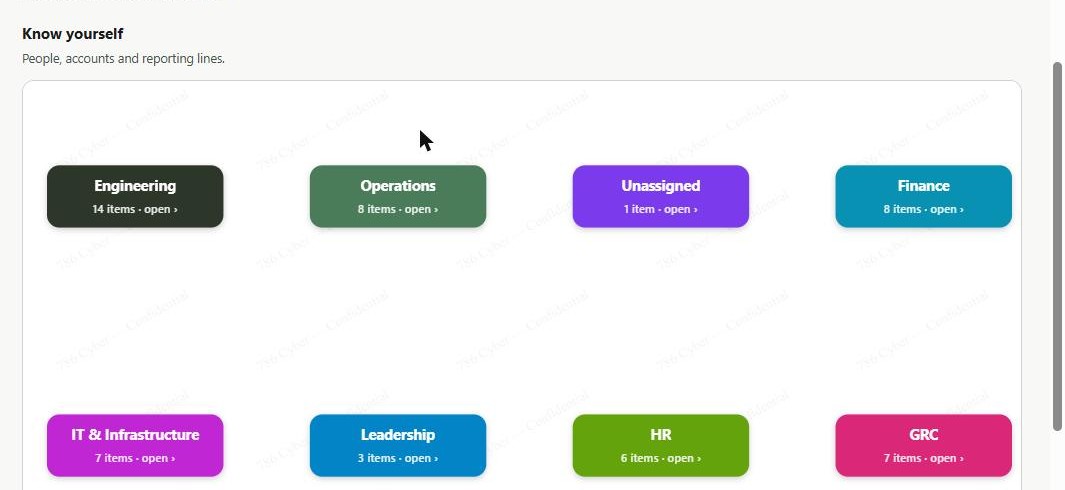
Section titled “Managing departments”Departments are first‑class in 786 Cyber, shown as colour‑coded cards.
- Create, edit or delete departments from the department management view.
- When you import people or assets, any department named in your file is auto‑created (with fuzzy matching, so “IT” and “I.T.” don’t become duplicates).
- Departments become the accountability owner for assets — every asset is tied to a department, which is what makes compliance reporting meaningful.
Assigning managers to build the org chart
Section titled “Assigning managers to build the org chart”Your org chart is built from the manager relationship on each person:
- Open a person from the People Directory.
- Set their manager (choose another person in your directory).
- Repeat as needed — each manager link adds a reporting line.
As you assign managers, the identity graph renders the reporting structure visually: people as nodes, reporting lines as connections, grouped by department. It’s the quickest way to spot gaps — someone with no manager, a department with no lead, or an unexpectedly flat or deep structure.
Tip: if you sync from Microsoft 365 or Google Workspace, manager relationships often come across automatically — review them and fill any gaps rather than starting from scratch.
Reading the graph
Section titled “Reading the graph”- Nodes are people (and, in the wider security map, assets).
- Lines show reporting relationships.
- Colour/grouping reflects departments.
- Use the graph’s controls to expand, filter, and focus on one department at a time.
Why it matters
Section titled “Why it matters”For everyday security: knowing who manages whom — and who owns which department — means alerts and actions reach the right person quickly, instead of landing nowhere.
For compliance: frameworks expect clear ownership and accountability. Departments give every asset and control an owner; the org chart evidences your management structure and supports roles and responsibilities, access approval, and starter/mover/leaver controls. It also makes access reviews far easier, because you can see reporting lines at a glance.
Next: Assets →